
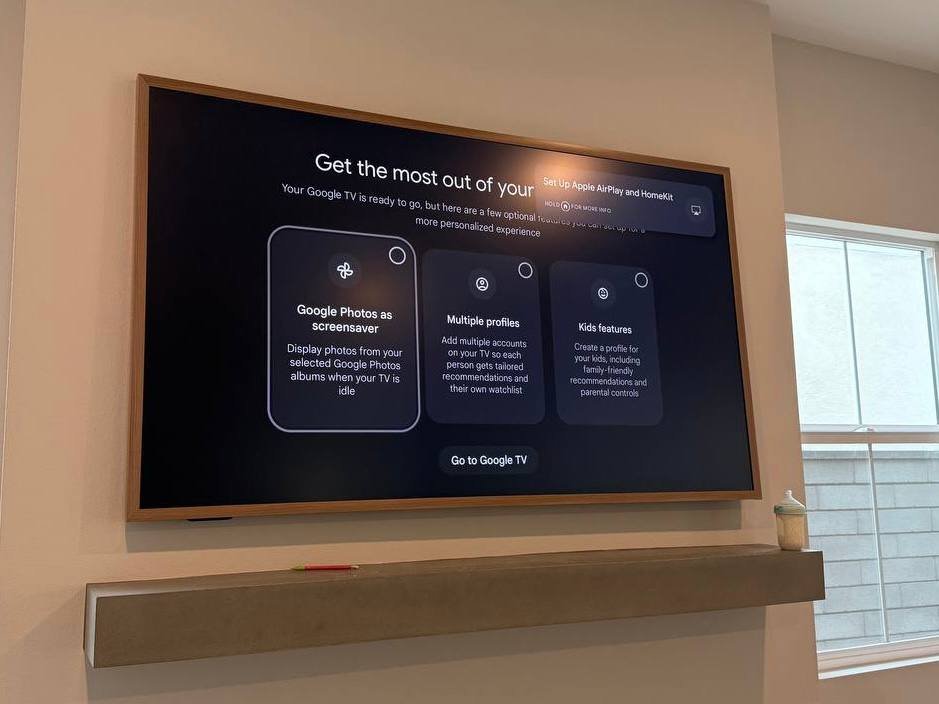
The Samsung Frame TV isn’t just a television. It’s a statement piece — a 4K QLED display that transforms into a beautiful art print when you’re not watching.
But here’s the catch: The Frame TV only looks like a real picture frame if it’s installed perfectly.
Hang it too thick → it looks like a TV pretending to be art.
Leave wires visible → the illusion shatters.
Mount it off-center → your “painting” looks crooked.
A standard TV installation won’t cut it. The Frame demands special attention to detail, specific mounting hardware, and a clear plan for the unique One Connect Box.
In this guide, we’ll walk you through exactly how a professional Samsung Frame TV installation should be done — and why it’s worth hiring experts who have done it before.
What Makes the Samsung Frame TV Different from Normal TVs?
Before we talk about installation, let’s understand what makes The Frame unique.
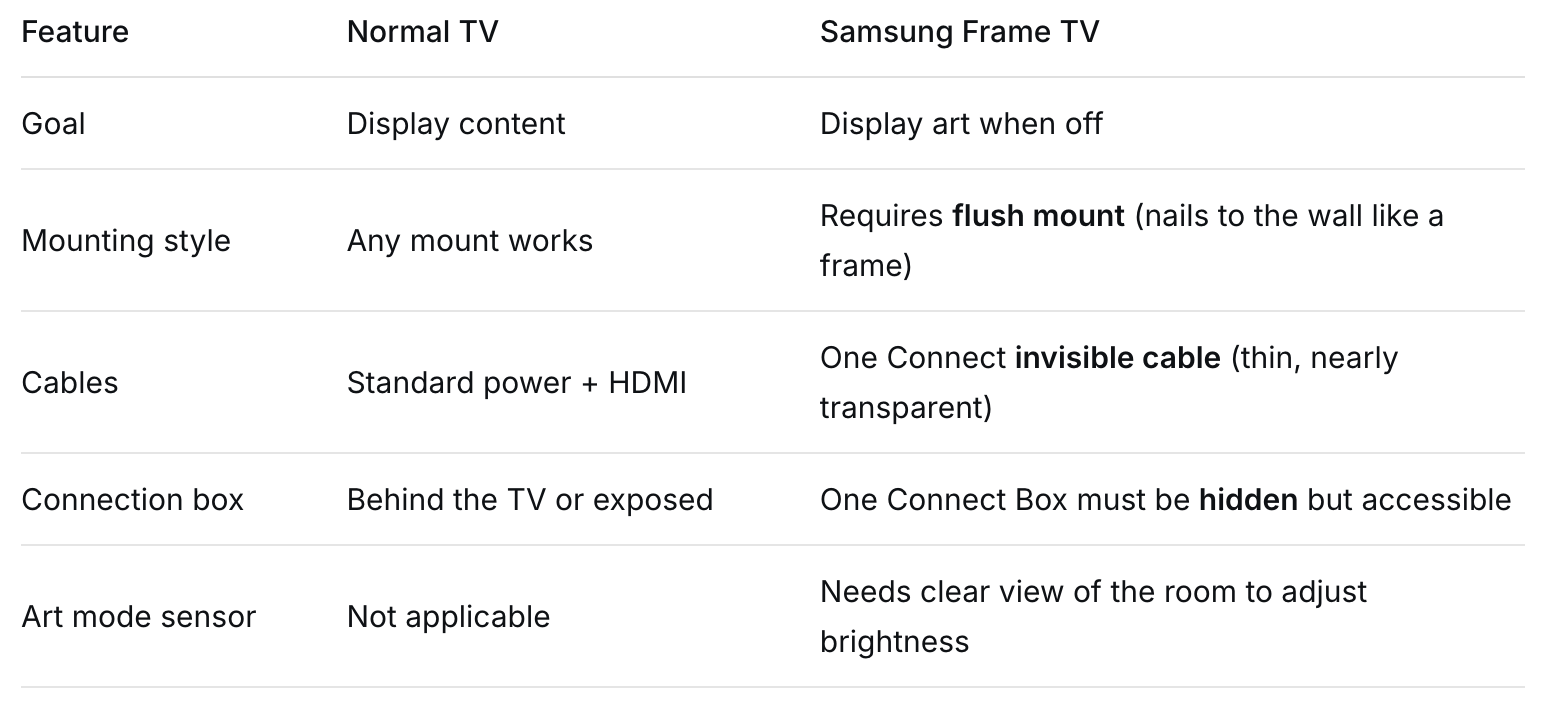
The core challenge: The Frame TV is designed to hang with zero gap between the back of the TV and the wall. Most standard mounts leave a 1–2 inch gap — which ruins the art effect completely.
✅ Swift TV standard: We use the included Samsung Slim Fit Wall Mount (or a compatible alternative) to achieve a gap of just 0.1 inches — the TV looks painted onto the wall.
Required Tools and Hardware for Frame TV Installation
Many homeowners buy a Frame TV, open the box, and realize they’re missing critical components.
What comes in the box:
The Frame TV panel
One Connect Box (about the size of a small book)
One Connect invisible cable (thin, transparent, ~16 ft long)
Power cord for the One Connect Box
Samsung Slim Fit Wall Mount (two small brackets)
IR repeater (for remote control if the box is hidden)
What you’ll need that’s NOT included:
Drywall anchors (if not mounting into studs)
A level (a must — this TV shows every millimeter of tilt)
Stud finder
Drill and appropriate bits
Optional but recommended: Recessed wall box for the One Connect Box
What you should buy separately:
Longer invisible cable (32 ft) if your One Connect Box is far from the TV
In-wall cable management kit if hiding the One Connect Box inside the wall is allowed (check local codes)
Step-by-Step Professional Frame TV Installation
Here’s exactly how Swift TV technicians install a Samsung Frame TV for a flawless result.
Step 1 – Choose the Exact Wall Location
The Frame TV is not a TV you move later. Because it hangs so flush, adjusting position after installation requires un-mounting and re-drilling.
We consider:
Eye level when seated (center of TV at 40–45 inches from floor)
No glare from windows or lights (Art Mode looks best in controlled lighting)
Access for the One Connect invisible cable (needs a path to the box)
Distance to the nearest power outlet
Step 2 – Plan the One Connect Box Location
This is the most common mistake in Frame TV installation. The One Connect Box must be:
Hidden from view (inside a media console, mounted behind the TV, or in a recessed wall box)
Accessible (you need to reach it to plug in HDMI devices)
Well-ventilated (it generates heat)
Three placement options:
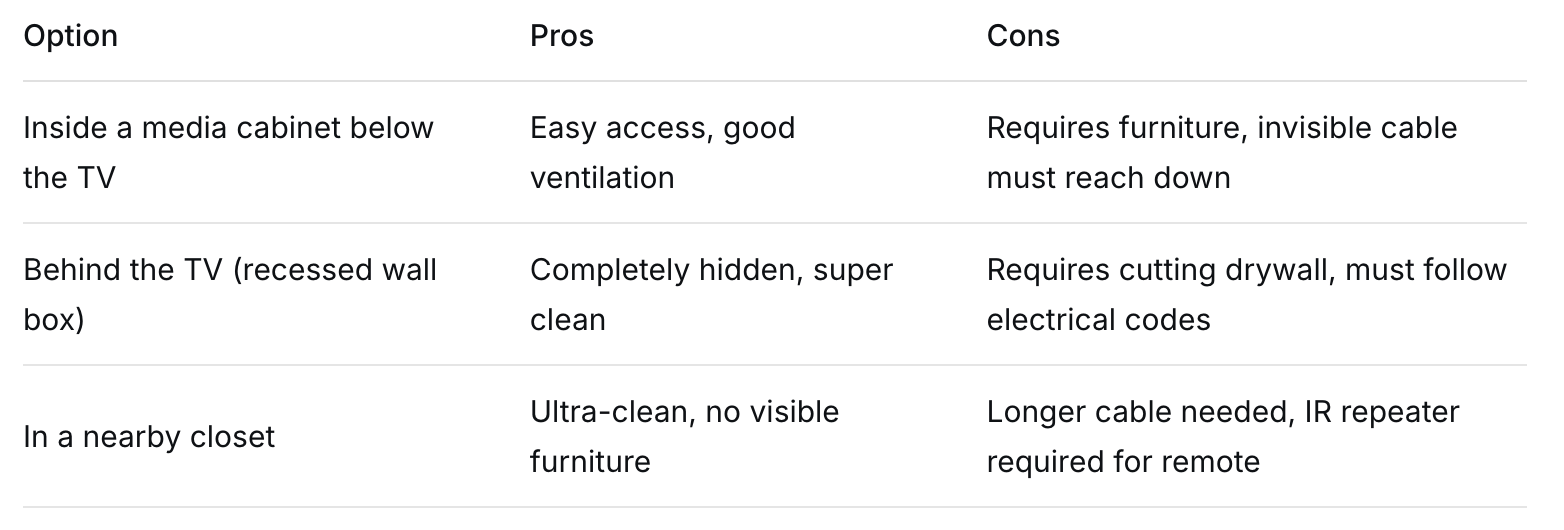
✅ Swift TV recommendation: For most homes, a recessed wall box behind the TV or a media console directly below is the best balance of clean and functional.
Step 3 – Mount the Slim Fit Brackets to the Wall
The Samsung Slim Fit mount consists of two small brackets that attach directly to the wall — not to a traditional backing plate.
Critical details:
The brackets must be perfectly level — even 1/16 inch off will make the TV look crooked
They must align with the mounting points on the back of the TV exactly
Use a stud finder to secure at least one bracket into a stud
For drywall-only mounting, use heavy-duty toggle bolts (rated for 100+ lbs)
Step 4 – Run the Invisible Cable
The One Connect invisible cable is thin and nearly transparent, but it still needs to be hidden for a clean look.
Routing options:
Inside the wall (most common — drill two small holes and fish the cable through)
Behind baseboards (if you cannot go inside the wall)
In a paintable cord cover (for renters or brick walls)
⚠️ Important safety note: The invisible cable carries power and data. Do not run it inside a wall without checking local electrical codes. In many jurisdictions, you must use an in-wall rated version of the cable or install a conduit.
Step 5 – Hang the TV and Level It
This step requires two people — the TV is thin, fragile, and expensive.
Lift the TV and align the back brackets with the wall brackets
Gently lower until you hear a click
Check level from multiple angles
The TV should sit 1–2 mm from the wall — no gap visible from the side
Step 6 – Set Up Art Mode
Hardware is only half the job. The Frame TV must be configured to actually look like art.
Professional setup includes:
Connecting to Wi-Fi and Samsung Art Store
Choosing a default art piece (or uploading your own photos)
Setting the brightness sensor to match room lighting
Adjusting the matte display settings for the best “paper-like” texture
Setting sleep timers (when the TV enters Art Mode after inactivity)
Common Frame TV Installation Mistakes (And How to Avoid Them)
Even professional installers make errors on Frame TVs if they don’t specialize in them.
Mistake #1: Using a standard TV mount
The included Slim Fit mount is the only way to achieve the zero-gap look. A standard mount leaves a 1–2 inch gap, and the TV no longer looks like a frame.
Mistake #2: Hiding the One Connect Box without ventilation
The box gets hot. If you hide it in a sealed wall cavity or a cramped cabinet without airflow, it will overheat and fail.
Mistake #3: Forgetting the IR repeater
If you hide the One Connect Box completely (e.g., in a closet), your remote control won’t work. The Frame TV comes with an IR repeater that must be installed correctly.
Mistake #4: Not checking for studs before drilling
The Slim Fit brackets are small — they need to hit wood or use heavy-duty anchors. Many DIYers drill into drywall only, and the TV falls within weeks.
Mistake #5: Ignoring Art Mode calibration
Without proper brightness and matte settings, Art Mode looks like a glowing screen, not like printed art. This defeats the entire purpose of buying The Frame.
✅ Swift TV approach: We have installed over 200 Frame TVs in Orange County. Every single installation includes Art Mode calibration as a standard step — not an extra.
Can You Mount a Frame TV Yourself?
If you’re wondering how to mount a Frame TV yourself, technically, yes. Realistically, we don’t recommend it — even for handy homeowners.
Why DIY Frame TV installation often fails:
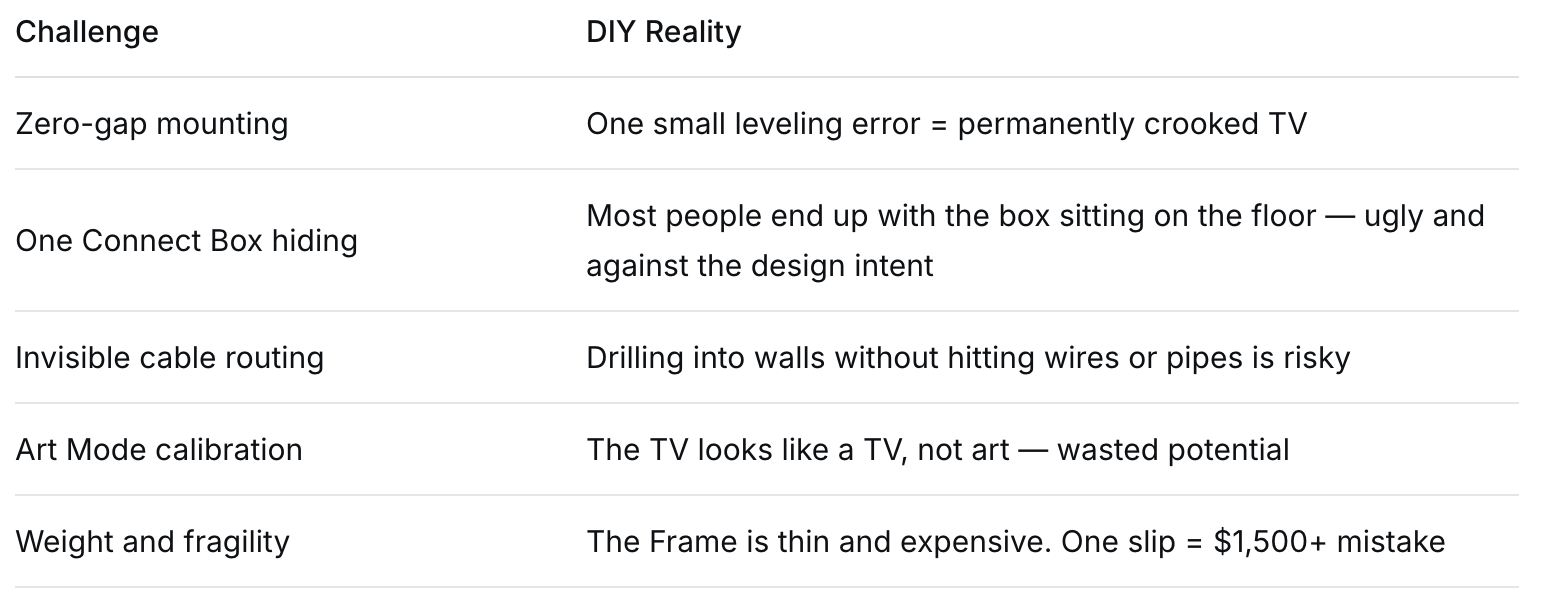
If you insist on DIY: At minimum, buy a stud finder, a high-quality level, and watch 3+ installation videos. And accept that you may need to call a professional afterward anyway.
Why Choose Swift TV for Your Samsung Frame TV Installation?
We aren’t general handymen who install any TV the same way. If you want to mount a Frame TV without visible wires, gaps, or alignment issues, we understand that The Frame is different — and we treat it that way. We understand that The Frame is different — and we treat it that way.
What you get with Swift TV:
- ✅ Zero-gap mounting — Your TV hangs flush, exactly like a picture frame
- ✅ Hidden One Connect Box — In a cabinet, recessed box, or behind the TV — never visible
- ✅ Invisible cable management — No visible wires, period
- ✅ Art Mode calibration — We make the art look like real art, not a screen
- ✅ Remote and sensor setup — Everything works perfectly, even with hidden components
- ✅ Respect for your home — Clean work, dust protection, and careful handling
Serving all of Orange County: Irvine, Costa Mesa, Tustin, Anaheim, Huntington Beach, Newport Beach, Orange, and surrounding cities.
Conclusion
The Samsung Frame TV is one of the most beautiful televisions ever made — but only when installed correctly. A standard mounting job will leave you with gaps, visible wires, and an Art Mode that looks like a glowing rectangle.
Don’t settle for “good enough” on a premium product.
 Let Swift TV install your Frame TV the right way
 Free consultation — we’ll show you exactly where and how your Frame will hang Upfront pricing — no surprises, no hidden fees Flush mount + hidden wires + Art Mode setup — all included Guaranteed results — or we make it right