
Mounting a TV seems simple. Drill a few holes, attach the bracket, hang the TV. What could go wrong?
Quite a lot, actually.
As professional installers, we’ve seen the same mistakes hundreds of times — often in homes where someone already “did it themselves” and now needs us to fix it.
The good news? Every single one of these mistakes is avoidable. Here are the 7 most common TV mounting errors and exactly how to prevent them.
Mistake #1 – Mounting the TV Too High
This is the #1 mistake we see. The “above the fireplace” trend has convinced everyone that TVs belong near the ceiling.
The problem: Neck strain within 30 minutes of watching.
The fix: The center of your TV should be at seated eye level — typically 40–45 inches from the floor. If you must mount higher (e.g., above a fireplace), use a tilting mount to angle the screen downward.
✅ Swift TV rule: We mock up the TV position with cardboard or a laser level before drilling. You sit on your couch and confirm the height feels comfortable.
Mistake #2 – Not Hiding the Wires
A beautiful TV with a messy bundle of cables dangling below looks incomplete and unprofessional.
The problem: Visible wires are ugly, collect dust, and create tripping hazards.
The fix: Use in-wall cable management, cord covers, or route wires behind a media console. For the cleanest result, hire a pro to install a recessed outlet directly behind the TV.
✅ Swift TV guarantee: No visible wires — ever. It’s not an upgrade. It’s our standard.
Mistake #3 – Missing the Studs
Drywall alone cannot hold a TV. Many DIYers use plastic anchors or hope the drywall is strong enough.
The problem: The TV falls off the wall — sometimes immediately, sometimes after weeks of slow loosening.
The fix: Always mount into wood studs using lag bolts. If studs are not available (e.g., brick or concrete), use heavy-duty toggle bolts or masonry anchors rated for your TV’s weight.
⚠️ Safety warning: A 65″ TV weighs 50+ lbs. Falling from the wall can injure children, pets, or adults — and destroy your TV.
Mistake #4 – Ignoring Viewing Angles
A fixed mount might save money, but it offers no flexibility. If your couch is off-center or windows create glare, you’ll regret the choice.
The problem: Glare makes the TV unwatchable during certain times of day. Off-angle seating means everyone cranks their neck.
The fix: Install a full-motion or tilting mount if your seating isn’t directly across from the TV or if sunlight hits the screen. The extra $50–100 is worth it.
Mistake #5 – Using the Wrong Mount for Your TV
Not all mounts fit all TVs. VESA patterns (the spacing of mounting holes on the back of your TV) vary by brand and size.
The problem: You buy a mount, open the box, and discover the arms don’t line up with your TV’s holes.
The fix: Check your TV’s VESA pattern before buying a mount. Common patterns: 200×200, 400×400, 600×400. Most universal mounts accommodate multiple patterns — but not all.
Mistake #6 – Forgetting About Cable Length
You hide the wires inside the wall — then realize your HDMI cable is 2 feet too short to reach your devices.
The problem: You either re-open the wall (frustrating) or leave the cable dangling (ugly).
The fix: Before hiding any wires, connect everything and confirm cable lengths. Buy longer cables if needed. For in-wall installations, use CL2 or CL3 rated cables (required by fire codes).
✅ Swift TV tip: We always add 3–4 extra feet of service loop behind the TV. Future you will thank present you.
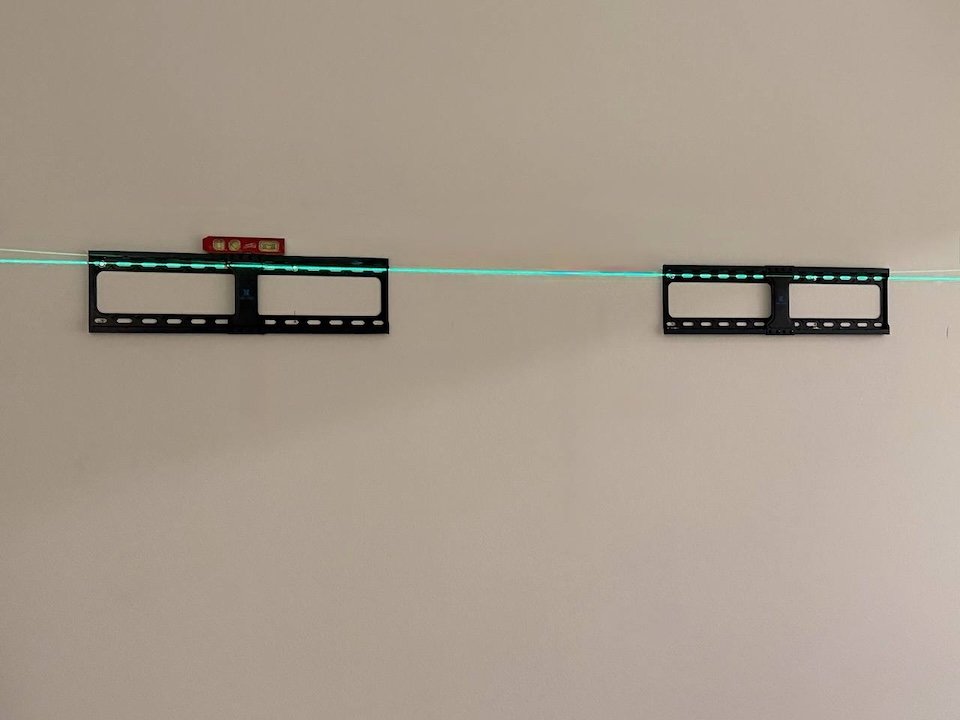
Mistake #7 – Rushing the Leveling Process
A TV that’s off by even 1 degree looks obviously crooked. Your eyes notice immediately.
The problem: The mount is slightly uneven, so the TV tilts to one side. It’s all you see every time you walk into the room.
The fix: Use a laser level or a high-quality bubble level. Check at three points: the wall bracket, the TV’s top edge, and the TV’s bottom edge. Never trust a phone app alone.
Bonus Mistake – DIY When You Should Have Called a Pro
Some mistakes are expensive to fix. A crooked mount means new holes in your wall. A fallen TV means a new TV entirely.
When to call a professional:
Your wall is brick, concrete, stone, or tile
You need to hide wires inside the wall
Your fireplace requires heat assessment
You have a Samsung Frame TV or other premium TV
You simply want it done right the first time
Conclusion
TV mounting looks simple — but the difference between “done” and “done right” is huge. The wrong height hurts your neck. Visible wires ruin the look. A missed stud can destroy your TV.
Don’t learn these lessons the hard way.
📞 Let Swift TV do it right the first time
👉 Free consultation — we’ll spot potential problems before they happen
👉 Upfront pricing — no surprises
👉 Clean installation with no visible wires — guaranteed
👉 Serving all of Orange County
“Everything was handled smoothly from start to finish. Andy was fantastic to work with. He was available quickly, arrived right on time, and his pricing was very competitive. The work was done efficiently and with great attention to detail. Everything was handled smoothly from start to finish. Highly recommend Andy for his professionalism and quality work!”
Sarah G.
Conclusion
TV mounting looks simple — but the difference between “done” and “done right” is huge. The wrong height hurts your neck. Visible wires ruin the look. A missed stud can destroy your TV.
Don’t learn these lessons the hard way.
📞 Let Swift TV do it right the first time
👉 Free consultation — we’ll spot potential problems before they happen
👉 Upfront pricing — no surprises
👉 Clean installation with no visible wires — guaranteed
👉 Serving all of Orange County
Mount it once. Mount it right.